No worries, Thunderbird comes to the rescue! 🙂
Tag: geek
Crivit pedometer and heart rate monitor review
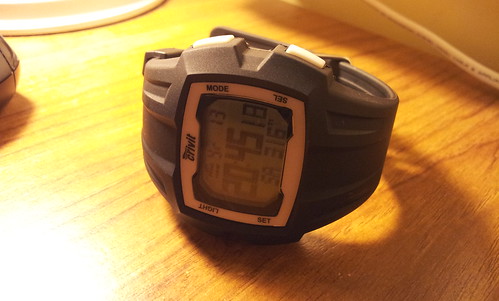
So, here it is! Last week I got a new gizmo in Lidl, a “spur of the moment” buy – well, in my defence I had seen it in the catalogue before, but since I was considering getting a bluetooth heart rate monitor to interface with my Android phone I didn’t give it that much thought. Anyway, when I went last week to Lidl for my groceries I had a long look at it and in the end the relatively low price (£14.99) convinced me 😀 .
It is quite full-featured (the user manual is quite sizeable, too!), having “regular” watch mode (eg comprising time & date, chronometer, alarm and even dual time zone support!), pedometer mode and HRM mode. The good news is that these functions are not independent, ie you can go for a run whilst tracking your heart rate and seeing all the relevant information on the screen, which albeit tiny is more than enough in terms of legibility (and it even has a blueish back-lighting to help when going for runs in the dark).
Aesthetics and ergonomics
OK, in terms of aesthetics is not the prettiest watch you’d find; it is quite bulky too, which is why I won’t retire my Casio – I’ll just take this one out of the drawer whenever I want to go for a run, as it is too big for everyday “normal” use. It is not as waterproof as my Casio, too – the manual states a tolerance of up to 3 bar, which according to them is just rain- and splash-resistance. Shame, I won’t be able to use it on the boat!… (anyway, for that I plan to get a cheap, waterproof Android phone and a Bluetooth HRM, as soon as my savings allow for that!…)
But it is functional, and the aforementioned display is good enough to accommodate the speed or HR as you’re going along in quite big digits, along with an accompanying graphic which, in pedometer mode will tell you if you are trending towards an increase or decrease in speed, and in HRM mode it will graphically tell you where your current HR is in terms of the typical minimum and maximum brackets for your age range (very handy!). There is also a bottom row with additional information which can be customised, eg you can select to have the distance run displayed alongside the speed, or your current heart rate, or your average speed… the choice is yours :).
The actual heart rate sensor is mounted on a chest strap (as all HRMs are), and I had absolutely no issue with it, and it seemed relatively comfortable in the 7.5k test run I had on Thursday. Probably in longer runs it might prove worse, I have to test that properly but unfortunately I don’t have proper long, uninterrupted running trails around here like I do in Porto, so that will have to wait for the Summer holidays! 😛
Functionality and user interface
As I mentioned before, the screen is quite good in terms of the amount of information it can display. The user interface is also quite simple to navigate, and I only had trouble finding some advanced settings because I didn’t read the user manual properly (more on that later). The rest is just a matter of navigating with one key and confirming with the other, and long-pressing to reset the counters. Nothing more simple!
The communication with the HR sensor is also quite simple (and apparently it is coded, so I won’t have problems with running with people also wearing HRMs!), the only issue is that you need to moisten the sensor in order for it to make proper contact with the skin, but that seems to be the case in most sensors out there…
One thing that I really liked is the fact that the timing will automatically stop when you are stationary (since it is detecting both my footsteps and the lack of them!…). Running in an urban setting here in England requires continuous stopping, as zebra crossings are rarer than the actual zebras around here, and the general rule to crossing a road is to cross anywhere, provided that there are no cars coming, which may work if you are walking but it is really annoying if you’re running. I would have to manually stop and start my stopwatch whenever that happened, which was not ideal, especially since I couldn’t hear if the action was actually carried out (I use earphones), and in the end I’d be continuously checking my watch to see if the timing was still on (and try doing that at night, even with a backlit screen!).
It also has some very neat stuff, such as memory of the highest/lowest/average heart rate, and fitness mode, which consists in measuring the heart rate drop along a specific period of time, which will assess your recovery after a strenuous exercise (of course you can always do this with a stopwatch and taking heart beat counts during 15 seconds, but it is much simpler this way!! 🙂 )
The only real issue I had with it, which was really all my fault, was related to the calibration of my step. Following the typical male technocrat attitude, I only skimmed across the (quite sizeable) user manual and skipped the section on pedometer calibration in its entirety. And the result was quite evident: the 7.5k test run I had on Thursday was counted as only 5k, and I could see during my workout that the “instantaneous” speed would never go over 10 kph, which is quite low for me, as my average pace is slightly below 5:00/km, which in kph should be exactly 12! (I have been ill and only returned to proper running recently, but still!…)
After that, I went to the troubleshoot section of the watch and there it was, written exactly for fools like myself, that if the speed readings were not presented correctly you’d have to calibrate the device. And actually the algorithm is quite sophisticated, as it takes into account a lower and an upper limit, which are configurable, and then asks you to run and walk a predefined distance to assess the size of your step. After calibrating it with a 400 m track I went on a test run again (I had the motivation of testing this watch, otherwise I wouldn’t have gone out as the weather was horribly windy and damp!) and I had a much lower error of about 300 m in a 4.5k run (and this time the error was by excess, it overestimated the distance ran). I will still do some additional calibrations, as I feel that I’ve set the higher limit too high (13 kph, when I normally run at 12!) and I’ve also used a quite short calibration track – next time I’ll do 1k, which is exactly two laps around my cul-de-sac.
◊/◊
In conclusion: for a fraction of the cost of a Garmin specialist runner watch (they retail for well over £100-£200!) you get something that will most definitely help you assess your running workouts (and they also thrown in a bicycle holder to use the watch as an HRM during a bike ride!). Obviously it doesn’t have exactly the same level of functionality (you didn’t expect GPS and data export from a £15 device, did you?), but if used while aware of its limitations it can serve you quite well. A must buy, definitely! 🙂
Blog appearance refreshed!
WordPress was nagging me for quite some time to update this to the latest (3.5.1?) version, and for a reason which I still don’t understand the automated upgrade process did not work (perhaps it is related to the fact that I’m using a free web hosting service, as I notice that some of the PHP functions take some time to run…).
Anyway, I upgraded it and decided to do a bit of spring cleaning (even though spring is nowhere to be seen around here!…). I settled for the Twenty Ten theme (Twenty Twelve looks nice but lacks areas to put widgets, it only provides a single sidebar!), and updated the header images (I think I’ll still add some more, time permitting – I have to re-size them to fit the space constraints on the header, and that still takes some time…).
However, I still can’t link my postings with Facebook. I’ve set it up as they instruct on their website, created the app, defined the Open Graph actions, but it still won’t work! And apparently I am not alone with this issue, as a simple Google search hinted.
Edit: apparently the issue randomly comes and goes, as my rant about the famous English weather (which is becoming a recurring topic… 😛 ) was automatically published to the Facebook timeline without any problems. Well, perhaps I shouldn’t care that much about this, I’ll just let it work it out on its own! 🙂
There you go!

I “fixed” the “designed for Windows XP” label. Much better now! (it would be perfect if our laser printer would print it in colour, but one can’t have it all..)
Dynamic wallpapers in a GNU/Linux desktop (or, for the record, anywhere!…)
Well, this is a bit of a script I wrote one year ago or so: I wanted to have the feature of rotating wallpapers back in GNOME 3.x (I’m pretty sure it existed back in GNOME 2.x! 🙂 ), hence I wrote a bit of Python that reads a list of images in a given folder, randomly picks one and sets it as the desktop wallpaper – pretty simple stuff!
[sourcecode language=”python” wraplines=”true”]#!/usr/bin/python
import os
import random
import mimetypes
import time
myBackgrounds = ‘~/wallpapers/’
def prepareList(pathname):
items = []
for item in os.listdir(myBackgrounds):
if "image" in mimetypes.guess_type(item)[0]:
items.append(item)
return items
def randomizeWallpaper(listOfFiles):
randomListIndex = random.randint(0,len(listOfFiles)-1)
#~ os.system(‘gsettings set org.gnome.desktop.background picture-uri "file:///’ + myBackgrounds + listOfFiles[randomListIndex] + ‘"’ ) # for GNOME session
os.system(‘xfconf-query -c xfce4-desktop -p /backdrop/screen0/monitor0/image-path -s %s’ % (myBackgrounds + listOfFiles[randomListIndex])) # for Xfce WM
if __name__ == "__main__":
listOfWallpapers = prepareList(myBackgrounds)
randomizeWallpaper(listOfWallpapers)
[/sourcecode]
In order to keep it running automatically every # of hours, I’ve just edited my crontab file (/etc/crontab) to run it periodically (in the case below it is configured to run every 6 hours…):
[sourcecode language=”text”]
SHELL=/bin/bash
PATH=/sbin:/bin:/usr/sbin:/usr/bin
MAILTO=root
# For details see man 4 crontabs
# Example of job definition:
# .—————- minute (0 – 59)
# | .————- hour (0 – 23)
# | | .———- day of month (1 – 31)
# | | | .——- month (1 – 12) OR jan,feb,mar,apr …
# | | | | .—- day of week (0 – 6) (Sunday=0 or 7) OR sun,mon,tue,wed,thu,fri,sat
# | | | | |
# * * * * * user-name command to be executed
0 */6 * * * manuel DISPLAY=:0.0 /home/manuel/bin/rotate-wallpapers.py > /dev/null
[/sourcecode]
And since my dynamic wallpaper folder is synced with Dropbox, I can have the same wallpapers in every computer I have access to (even – gah – Windows machines!). Furthermore, I also have all my wallpapers on my Android phone, courtesy of DropSync (which pulls the images from Dropbox whenever there’s a change in there and downloads them to a folder on my memory card) and a dynamic wallpaper thingy called Wallpaper Slideshow. Both are free of charge at the Play Store, and the latter is extremely configurable!
A final note regarding my collection of wallpapers: all of them are photos I took, I want them to remind me of places I’ve been to… and places where I want to be! 🙂 It really brightens my day whenever I see a lovely photo of River Douro on my work desktop, for instance… 😉
Hmm.. I wonder what is this for?

Vodafone UK has some free SMS-based services such as this one, in which you text a given number and it returns you your approximate location (I reckon based on cell tower location services..). This seemed like an interesting service, but I was failing to see the point of it – until I saw the rest of the text. Of course! The Brits and their drinking habits… 🙂
Upgrading my machine to Fedora 18, aka “Spherical Cow”…

I am using the new “fedup” method, which appears to work well. It takes a lot of time, though… (in Fedora documentation they suggest one should go get a coffee or something… I’ve watched two series on BBC iPlayer and that thing is still going! :-P)
The inside of my everyday backpack in 2008

Via Flickr:
All of these things (with some small exceptions) are still working!
– The G3 PowerBook has since retired (replaced by an ASUS netbook and then afterwards by a second-hand ThinkPad), for a time it provided hosting for my Mac museum webpage.
– The white, fourth-gen 60 GB iPod is now permanently docked in a set of powered speakers, its battery has since been replaced. The hard drive is a bit temperamental, but it mostly works!
– My old Palm Z22 and the little Nokia 6070 phone were both replaced when I got my first smartphone, a Palm Centro. Years later, I still used the Centro when I travelled abroad, due to the unavailability (at the time) of MetrO for Android (a public transport route planner).
– Unfortunately, the earphones pictured are only partially working, one of the channels is not making proper contact (I still intend to re-solder them, they are very comfortable to use! 🙂 )
– The TI-84 calculator proved relatively useful on my 1st year at the university, but afterwards things became either too demonstration-based or too complex to make any good use of it…
– The pencil case is still the same! (I think I have it since year 8 or something… 😉 )
– And so is the keyring, with the difference that now I have much more keys in it…
The entrance to my lab…
Via Flickr:
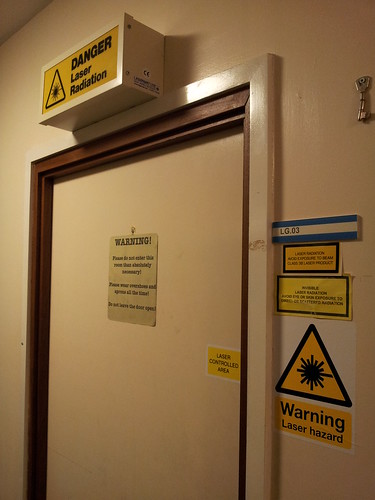
… or how many LASER warning signs you can fit around an entrance door 😀 .
And yes, I have a interlock system fitted to the lab door, even though I’m not using it (my superluminiscent source is only class IIIB, not too bad – it "only" outputs 6 mW! 🙂 )
Let it snow, let it snow…
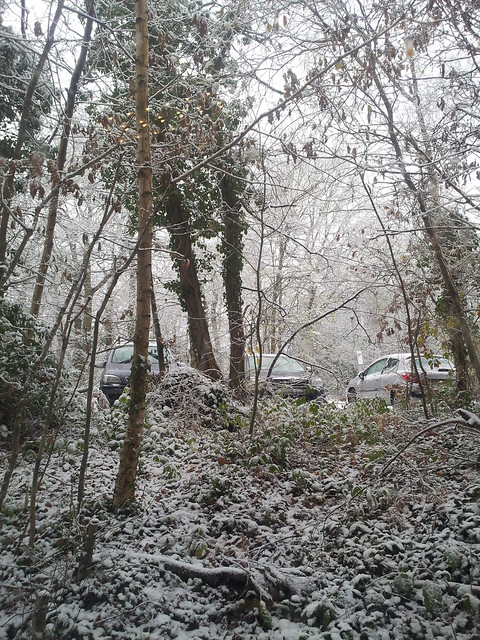
Absolutely fantastic. I had obviously seen snow before (Portugal is a southern country, but it can get to subzero temperatures in the countryside and in the mountains!…), but since it only snows in Porto every 15 years or so (and even when it actually snows it is never that intense, just a few flakes that melt immediately when they hit the ground) I saw snow falling for the very first time. And it was magical, I was grinning from ear to ear 😀 .

Actually, I was a bit fortunate, as it only started snowing heavily when I was already inside my office – I still had to deal with the ice on my driveway (grabbing the bicycle in one hand, and the handrail in the other, while slowly and carefully climbing up the ramp out!… 🙂 ), but that was about it. And obviously, this being England, the public transportation systems grounded to a halt – my housemate actually had to get a cab in order to get to work, there were trains cancelled and major traffic jams along the motorway (it pays off to live close to campus! :D). Hopefully next week I’ll be able to make it to the airport to get my flight to Porto, fingers crossed… (I will give the whole day to get there, though, just to be safe!)
OK, any major news? Well, surprise surprise, Santa came earlier to my place and I got myself a shiny Galaxy S II (a review to follow, perhaps this weekend, time-permitting). On contract, with 10% off due to a student discount, I’m paying only £22.5 for 2 years, which is not too bad, especially when considering what the plan offers and that I paid nothing for what is still a very good smartphone (actually, all the images of this blog post were taken with it – and it films in 1080p, which I found pretty darn good 😉 ).
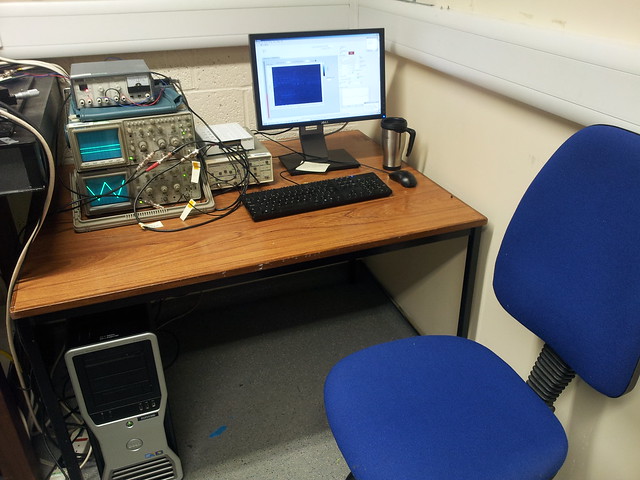
The work is, somehow, progressing (at least, that’s what I say to myself every day after staying up late in the lab ramming my head against the wall to make my code work). And today I got myself a new desk for my lab, so now I can work comfortably in my computer (properly stocked on tea, obviously). And next week I will have my last lab session of 2012, with plenty of lab report marking to follow (yay!). That, along with an article I will have to write for a conference proceedings will keep me busy while recovering from my surgery and hopefully keeping myself from being terribly annoyed of not being able to row when the river and the club are so close by!… 😛

Hello there, and welcome to my personal web page/blog!
My name is Manuel Marques, and I’m a lecturer in the School of Physics and Astronomy at the University of Kent (United Kingdom). I am also a researcher in the Applied Optics Group at the same institution. My work lies mostly in the area of Applied Optics, namely white light interferometry and its two/three-dimensional variant, optical coherence tomography.
Outside work I'm a keen runner/sculler/rower/cyclist, and I do enjoy being in the outdoors (photographing them is a bonus, too!). Other hobbies include tinkering with things, both big and small (not always with a positive outcome, I must say), travelling, reading, in no specific order.